
Langfuse 익스포터
Koog는 관측 가능성(observability) 데이터의 개방형 표준인 OpenTelemetry를 사용하여 에이전트 트레이스를 생성합니다. 이러한 트레이스를 Langfuse로 전송하기 위해, Koog는 별도의 수동 설정(manual instrumentation) 없이도 사용할 수 있는 내장 OpenTelemetry 익스포터를 포함하고 있습니다.
연결이 완료되면 Langfuse의 OpenTelemetry 지원을 통해 에이전트가 LLM, 도구 및 외부 API와 상호작용하는 방식을 시각화하고 분석하며 디버깅할 수 있습니다.
설정 방법
- 설정 가이드를 따라 Langfuse 프로젝트를 생성합니다.
- Organization Settings > API Keys에서
public key와secret key를 가져옵니다. - 호스트, 퍼블릭 키(public key), 시크릿 키(secret key)를 제공합니다. 이는
addLangfuseExporter()함수의 파라미터로 전달하거나, 아래와 같이 환경 변수를 통해 설정할 수 있습니다.
   export LANGFUSE_HOST="https://cloud.langfuse.com"
   export LANGFUSE_PUBLIC_KEY="<your-public-key>"
   export LANGFUSE_SECRET_KEY="<your-secret-key>"
구성
Langfuse 내보내기를 활성화하려면 OpenTelemetry 피처(feature)를 설치하고 addLangfuseExporter()를 호출합니다.
기본 예시
=== "Kotlin"
<!--- INCLUDE
import ai.koog.agents.core.agent.AIAgent
import ai.koog.agents.features.opentelemetry.feature.OpenTelemetry
import ai.koog.agents.features.opentelemetry.integration.langfuse.addLangfuseExporter
import ai.koog.prompt.executor.clients.openai.OpenAIModels
import ai.koog.prompt.executor.llms.all.simpleOpenAIExecutor
import kotlinx.coroutines.runBlocking
val promptExecutor = simpleOpenAIExecutor("openai-api-key")
-->
```kotlin
fun main() = runBlocking {
    val agent = AIAgent(
        promptExecutor = promptExecutor,
        llmModel = OpenAIModels.Chat.GPT4oMini,
        systemPrompt = "You are a code assistant. Provide concise code examples."
    ) {
        install(OpenTelemetry) {
            addLangfuseExporter()
        }
    }

    println("Running agent with Langfuse tracing")

    val result = agent.run("Tell me a joke about programming")
    println("Result: $result
See traces on the Langfuse instance") } ```
=== "Java"
<!--- INCLUDE
import ai.koog.agents.core.agent.AIAgent;
import ai.koog.agents.features.opentelemetry.feature.OpenTelemetry;
import ai.koog.agents.features.opentelemetry.integration.langfuse.LangfuseKt;
import ai.koog.prompt.executor.clients.openai.OpenAIModels;
import ai.koog.prompt.executor.model.PromptExecutor;
public class exampleLangfuseExporterJava01 {
    static PromptExecutor promptExecutor = PromptExecutor.builder()
        .openAI("openai-api-key")
        .build();
-->
<!--- SUFFIX
}
-->
```java
public static void main(String[] args) {
    var agent = AIAgent.builder()
        .promptExecutor(promptExecutor)
        .llmModel(OpenAIModels.Chat.GPT4oMini)
        .systemPrompt("You are a code assistant. Provide concise code examples.")
        .install(OpenTelemetry.Feature, config ->
            LangfuseKt.addLangfuseExporter(config)
        )
        .build();

    System.out.println("Running agent with Langfuse tracing");

    var result = agent.run("Tell me a joke about programming");
    System.out.println("Result: " + result + "
See traces on the Langfuse instance"); } ```
트레이스 속성 (Trace attributes)
Koog가 에이전트 활동을 Langfuse로 전송할 때, 이는 LLM 호출이나 도구 실행과 같은 개별 작업 기록인 스팬(spans) 시리즈로 수행됩니다. 관련된 스팬들은 하나의 트레이스(trace)로 그룹화되며, 이는 시작부터 끝까지의 전체 에이전트 실행을 나타냅니다.
addLangfuseExporter()는 각 트레이스의 루트(root)에 첨부되는 키-값 쌍의 리스트인 traceAttributes 파라미터를 받습니다. 이를 통해 세션, 환경, 태그와 같은 Langfuse 전용 기능을 활성화하여 Langfuse UI에서 트레이스를 쉽게 필터링하고 그룹화할 수 있습니다.
지원되는 속성의 전체 목록은 Langfuse OpenTelemetry 문서를 참조하세요.
일반적으로 포함되는 속성:
- 세션 ID (
langfuse.session.id): 집계된 메트릭, 비용 분석 및 스코어링을 위해 관련 트레이스를 그룹화합니다. - 환경 (
langfuse.environment): 운영(production) 트레이스를 개발 및 스테이징 환경과 분리합니다. - 태그 (
langfuse.trace.tags): 피처 이름, 실험 ID 또는 고객 세그먼트로 트레이스에 레이블을 지정합니다 (문자열 배열).
세션과 태그를 사용한 예시
=== "Kotlin"
<!--- INCLUDE
import ai.koog.agents.core.agent.AIAgent
import ai.koog.agents.features.opentelemetry.attribute.CustomAttribute
import ai.koog.agents.features.opentelemetry.feature.OpenTelemetry
import ai.koog.agents.features.opentelemetry.integration.langfuse.addLangfuseExporter
import ai.koog.prompt.executor.clients.openai.OpenAIModels
import ai.koog.prompt.executor.llms.all.simpleOpenAIExecutor
import kotlinx.coroutines.runBlocking
import java.util.UUID
val promptExecutor = simpleOpenAIExecutor("openai-api-key")
-->
```kotlin
fun main() = runBlocking {
    val sessionId = UUID.randomUUID().toString()

    val agent = AIAgent(
        promptExecutor = promptExecutor,
        llmModel = OpenAIModels.Chat.GPT4oMini,
        systemPrompt = "You are a helpful assistant."
    ) {
        install(OpenTelemetry) {
            addLangfuseExporter(
                traceAttributes = listOf(
                    CustomAttribute("langfuse.session.id", sessionId),
                    CustomAttribute("langfuse.trace.tags", listOf("chat", "kotlin", "production"))
                )
            )
        }
    }

    println("Running agent with Langfuse tracing")

    // 동일한 세션 ID를 가진 여러 실행은 Langfuse에서 그룹화됩니다.
    agent.run("What is Kotlin?")
    agent.run("Show me a coroutine example")
}
```
<!--- KNIT example-langfuse-exporter-02.kt -->
=== "Java"
::: note
Java에서 traceAttributes를 설정하는 것은 현재 지원되지 않습니다. 이는 내부 Kotlin 함수가 kotlin.time.Duration 파라미터(value class)를 포함하고 있어, 해당 파라미터 이후의 모든 오버로드에 JVM 이름 맹글링(JVM-name mangling)을 발생시키기 때문입니다. traceAttributes가 필요한 경우에는 위의 Kotlin 예제를 사용하십시오. :::
트레이스 대상
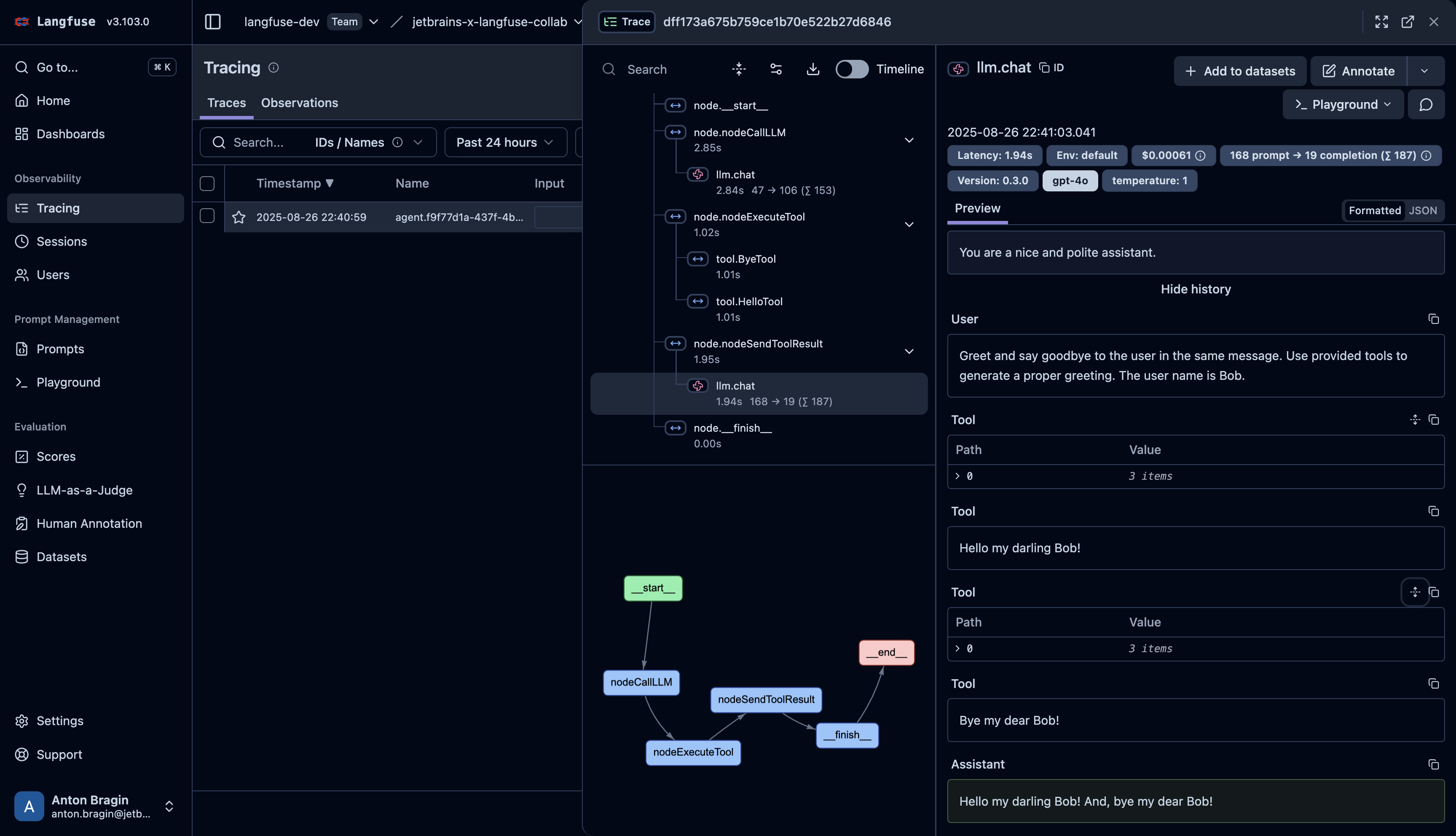
Langfuse 익스포터는 Koog의 일반 OpenTelemetry 연동과 동일한 활동을 캡처합니다. 또한 Langfuse에서 에이전트 그래프(Agent Graphs)를 표시하는 데 필요한 스팬 속성도 캡처합니다.
캡처되는 스팬의 전체 목록과 LLM 프롬프트 및 응답 내용을 포함하는 방법은 트레이스 대상을 참조하세요.
Langfuse에서 시각화하면 트레이스는 다음과 같이 나타납니다: 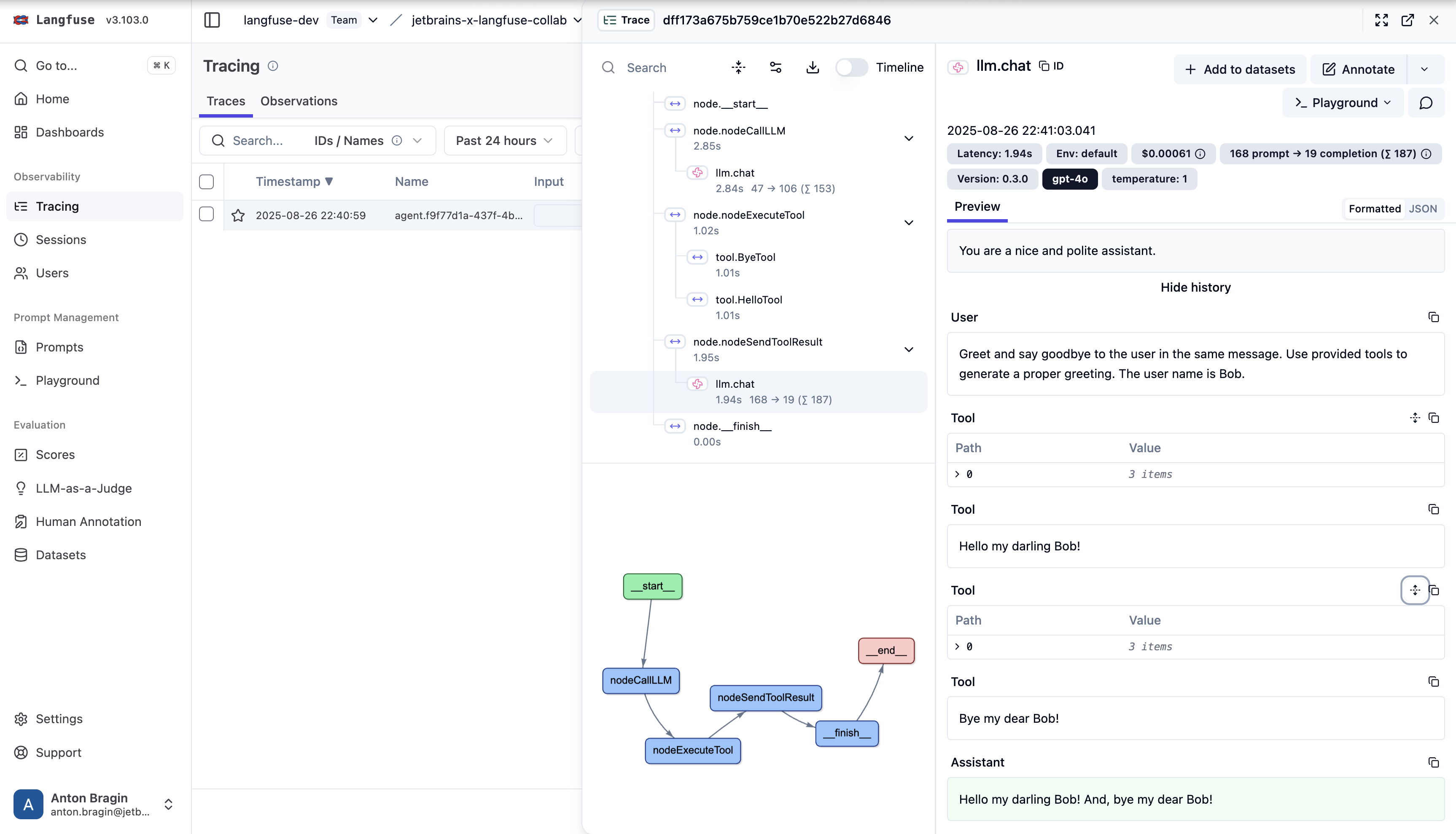
Langfuse OpenTelemetry 트레이싱에 대한 자세한 내용은 다음을 참조하세요:
Langfuse OpenTelemetry 문서.
문제 해결
- 트레이스가 나타나지 않음:
LANGFUSE_HOST,LANGFUSE_PUBLIC_KEY,LANGFUSE_SECRET_KEY가 설정되어 있는지, 그리고 키 쌍이 올바른 프로젝트에 속해 있는지 확인하세요. - 연결 문제: 자체 호스팅(self-hosted) Langfuse를 사용하는 경우, 사용자의 환경에서
LANGFUSE_HOST에 접속 가능한지 확인하세요.
일반적인 문제 해결 방법은 문제 해결을 참조하세요.