
在您的應用程式中使用多平台資源
當您為專案設定好資源後,請組建專案以產生特殊的 Res 類別,該類別提供對資源的存取。若要重新產生 Res 類別和所有的資源存取子,請再次組建專案或在 IDE 中重新匯入專案。
之後,您可以使用產生的類別從程式碼或外部程式庫存取已配置的多平台資源。
請閱讀以下主題的詳細資訊:
- 匯入產生的
Res類別和存取子。 - 自訂存取子類別生成:如何將其設為公開 (public)、指派給套件或無條件生成。
- 處理特定資源型別:
- 可繪製 (Drawable) 資源,例如簡單圖像、點陣化圖像或 XML 向量。
- 來自 Material Symbols 程式庫的 向量 Android XML 圖示。
- 字串,包括簡單字串、範本、陣列和複數 (plurals)。
- 儲存與載入自訂字型。
- 原始檔案 (Raw files) 以及將位元組陣列轉換為圖像。
- 存取與字串 ID 對應的資源。
- 將多平台資源作為 Android assets 使用。
- 處理 Web 特定資源:
- 使用外部資源: 來自外部程式庫、 遠端檔案 以及 Java 資源。
匯入產生的類別
若要使用準備好的資源,請匯入產生的類別,例如:
import project.shared.generated.resources.Res
import project.shared.generated.resources.example_image
這裡:
project是您的專案名稱shared是您放置資源目錄的模組Res是產生類別的預設名稱example_image是composeResources/drawable目錄中圖像檔案的名稱(例如example_image.png)。
自訂存取子類別生成
您可以使用 Gradle 設定來根據需求自訂產生的 Res 類別。
在 build.gradle.kts 檔案的 compose.resources {} 區塊中,您可以指定多個設定,這些設定會影響專案生成 Res 類別的方式。 配置範例如下:
compose.resources {
    publicResClass = false
    packageOfResClass = "me.sample.library.resources"
    generateResClass = auto
}publicResClass設置為true會使產生的Res類別變為公開。預設情況下,產生的類別是 internal。packageOfResClass允許您將產生的Res類別指派給特定套件(以便在程式碼中存取,以及在最終產物中進行隔離)。預設情況下,Compose Multiplatform 會將{group name}.{module name}.generated.resources套件指派給該類別。generateResClass設置為always會使專案無條件地產生Res類別。當資源程式庫僅透過遞移 (transitively) 方式可用時,這很有用。預設情況下,Compose Multiplatform 使用auto值,僅當目前專案對資源程式庫有明確的implementation或api相依性時,才會產生Res類別。
資源用法
圖像
您可以將可繪製資源作為簡單圖像、點陣化圖像或 XML 向量來存取。 SVG 圖像在 除 Android 以外 的所有平台均受支援。
要將可繪製資源作為
Painter圖像存取,請使用painterResource()函式:kotlin@Composable fun painterResource(resource: DrawableResource): Painter {...}painterResource()函式接收資源路徑並傳回一個Painter值。該函式在除 Web 以外的所有目標平台上均以同步方式運作。對於 Web 目標,它會在第一次重組 (recomposition) 時傳回一個空的Painter,隨後的重組中會替換為載入後的圖像。painterResource()會針對.png、.jpg、.bmp、.webp等點陣化圖像格式載入BitmapPainter,或針對 Android XML 向量可繪製格式載入VectorPainter。- XML 向量可繪製資源與 Android 格式相同,但它們不支援對 Android 資源的外部引用。
要將可繪製資源作為
ImageBitmap點陣化圖像存取,請使用imageResource()函式:kotlin@Composable fun imageResource(resource: DrawableResource): ImageBitmap {...}要將可繪製資源作為
ImageVectorXML 向量存取,請使用vectorResource()函式:kotlin@Composable fun vectorResource(resource: DrawableResource): ImageVector {...}
以下是如何在 Compose Multiplatform 程式碼中存取圖像的範例:
Image(
    painter = painterResource(Res.drawable.my_image),
    contentDescription = null
)
圖示
您可以使用來自 Material Symbols 程式庫的向量 Android XML 圖示:
開啟 Google Fonts 圖示 庫,選擇一個圖示,切換到 Android 分頁,然後點擊 Download。
將下載的 XML 圖示檔案新增至多平台資源的
drawable目錄中。開啟 XML 圖示檔案並將
android:fillColor設置為#000000。 移除任何其他用於顏色調整的 Android 特定屬性,如android:tint。修改前:
xml<vector xmlns:android="http://schemas.android.com/apk/res/android" android:width="24dp" android:height="24dp" android:viewportWidth="960" android:viewportHeight="960" android:tint="?attr/colorControlNormal"> <path android:fillColor="@android:color/white" android:pathData="..."/> </vector>修改後:
xml<vector xmlns:android="http://schemas.android.com/apk/res/android" android:width="24dp" android:height="24dp" android:viewportWidth="960" android:viewportHeight="960"> <path android:fillColor="#000000" android:pathData="..."/> </vector>組建專案以產生資源存取子,或讓 Kotlin Multiplatform IDE 外掛程式 自動處理。
以下是如何在 Compose Multiplatform 程式碼中存取圖示並使用 colorFilter 參數調整顏色的範例:
Image(
    painter = painterResource(Res.drawable.ic_sample_icon),
    contentDescription = "Sample icon",
    modifier = Modifier.size(24.dp),
    colorFilter = ColorFilter.tint(Color.Blue)
)
字串
將所有字串資源儲存在 composeResources/values 目錄下的 XML 檔案中。 每個檔案中的每個項目都會產生一個靜態存取子。
Compose Multiplatform 支援類 Emmet 的縮寫語法,可直接在 XML 檔案中新增字串資源、字串陣列和複數。 例如,當您在 strings.xml 中輸入 test{Example} 或 s.test{Example} 並按下 Tab 時,它會自動展開為 <string name="test">Example</string>。
關於如何為不同區域設定進行字串在地化的更多資訊,請參閱 字串在地化指南。
簡單字串
要儲存簡單字串,請在 XML 中加入 <string> 元素:
<resources>
    <string name="app_name">My awesome app</string>
    <string name="title">Some title</string>
</resources>
要將字串資源作為 String 獲取,請使用以下程式碼:
@Composable
fun stringResource(resource: StringResource): String {...}

@Composable
fun stringResource(resource: StringResource, vararg formatArgs: Any): String {...}
例如:
Text(stringResource(Res.string.app_name))suspend fun getString(resource: StringResource): String
suspend fun getString(resource: StringResource, vararg formatArgs: Any): String例如:
coroutineScope.launch {
    val appName = getString(Res.string.app_name)
}
您可以在字串資源中使用特殊符號:
– 用於換行\t– 用於定位符號 (tab)\uXXXX– 用於特定的 Unicode 字元
您不需要像 Android 字串 那樣對 "@" 或 "?" 等特殊 XML 字元進行轉義。
使用類 Emmet 的語法並按下 Tab 以將縮寫展開為字串標籤:
test→<string name="test"></string>test{Example}→<string name="test">Example</string>
字串範本
目前,字串資源對引數 (arguments) 提供基本支援。 建立範本時,請使用 %<number> 格式在字串中放置引數,並包含 $d 或 $s 後綴以指示它是變數占位符而非簡單文字。 例如:
<resources>
    <string name="str_template">Hello, %2$s! You have %1$d new messages.</string>
</resources>
建立並匯入字串範本資源後,您可以在引用它時按正確順序傳遞占位符的引數:
Text(stringResource(Res.string.str_template, 100, "User_name"))$s 和 $d 後綴之間沒有區別,且不支援其他後綴。 您可以在資源字串中放入 %1$s 占位符,並用它來顯示小數,例如:
Text(stringResource(Res.string.str_template, "User_name", 100.1f))您可以使用內嵌數字快速鍵來取代手動輸入
%1$s或%2$d作為占位符。 例如,當您在字串值中輸入1或1s時,它會展開為%1$s。 同樣地,當您輸入2d時,它會展開為%2$d。
字串陣列
您可以將相關字串分組到一個陣列中,並自動將其作為 List<String> 物件存取:
<resources>
    <string name="app_name">My awesome app</string>
    <string name="title">Some title</string>
    <string-array name="str_arr">
        <item>item \u2605</item>
        <item>item \u2318</item>
        <item>item \u00BD</item>
    </string-array>
</resources>
要獲取對應的清單,請使用以下程式碼:
@Composable
fun stringArrayResource(resource: StringArrayResource): List<String> {...}
例如:
val arr = stringArrayResource(Res.array.str_arr)
if (arr.isNotEmpty()) Text(arr[0])suspend fun getStringArray(resource: StringArrayResource): List<String>例如:
coroutineScope.launch {
    val appName = getStringArray(Res.array.str_arr)
}
您可以使用類 Emmet 的語法來快速定義字串陣列。 使用
string-array、sa或>運算子來產生空的陣列範本。 對於具有預定義項目數量和起始文字的具名陣列,請輸入test>2{Hello}並按下 Tab:xml<string-array name="test"> <item>Hello</item> <item>Hello</item> </string-array>
複數 (Plurals)
當您的 UI 顯示某物的數量時,您可能希望支援不同數量(一個 book、多個 books 等)的語法一致性,而無需建立程式碼上無關的字串。
Compose Multiplatform 中的概念和基礎實作與 Android 上的數量字串相同。 請參閱 Android 文件 以了解更多關於在專案中使用複數的最佳實務和細微差別。
- 支援的變體有
zero、one、two、few、many和other。請注意,並非所有變體都會在每種語言中被考慮:例如,英語中會忽略zero,因為它與除 1 以外的任何其他複數相同。請依賴語言專家來了解該語言實際要求的區分。 - 通常可以透過使用數量中性的表達方式(如 "Books: 1")來避免數量字串。如果這不會降低使用者體驗,
要定義複數,請在 composeResources/values 目錄下的任何 .xml 檔案中加入 <plurals> 元素。 plurals 集合是一個透過 name 屬性(而非 XML 檔案名稱)引用的簡單資源。 因此,您可以在一個 <resources> 元素下的同一個 XML 檔案中將 plurals 資源與其他簡單資源組合在一起:
<resources>
    <string name="app_name">My awesome app</string>
    <string name="title">Some title</string>
    <plurals name="new_message">
        <item quantity="one">%1$d new message</item>
        <item quantity="other">%1$d new messages</item>
    </plurals>
</resources>
要將複數作為 String 存取,請使用以下程式碼:
@Composable
fun pluralStringResource(resource: PluralStringResource, quantity: Int): String {...}

@Composable
fun pluralStringResource(resource: PluralStringResource, quantity: Int, vararg formatArgs: Any): String {...}
例如:
Text(pluralStringResource(Res.plurals.new_message, 1, 1))suspend fun getPluralString(resource: PluralStringResource, quantity: Int): String
suspend fun getPluralString(resource: PluralStringResource, quantity: Int, vararg formatArgs: Any): String例如:
coroutineScope.launch {
    val appName = getPluralString(Res.plurals.new_message, 1, 1)
}
您可以使用類 Emmet 的語法來產生複數資源。 例如,使用
plurals、p或:來產生預設的空字串範本。 如果您在values-en/strings.xml中工作,IDE 會自動偵測區域設定、所需的數量,以及英語僅需要one和other。 輸入p.test或plurals.test並按下 Tab 以將縮寫展開為plurals區塊:xml<plurals name="test"> <item quantity="one"></item> <item quantity="other"></item> </plurals>
字型
將自訂字型以 *.ttf 或 *.otf 檔案的形式儲存在 composeResources/font 目錄中。
要將字型載入為 Font 型別,請使用 Font() 可組合函式:
@Composable
fun Font(
    resource: FontResource,
    weight: FontWeight = FontWeight.Normal,
    style: FontStyle = FontStyle.Normal
): Font
例如:
@Composable
private fun InterTypography(): Typography {
    val interFont = FontFamily(
        Font(Res.font.Inter_24pt_Regular, FontWeight.Normal),
        Font(Res.font.Inter_24pt_SemiBold, FontWeight.Bold),
    )

    return with(MaterialTheme.typography) {
        copy(
            displayLarge = displayLarge.copy(fontFamily = interFont, fontWeight = FontWeight.Bold),
            displayMedium = displayMedium.copy(fontFamily = interFont, fontWeight = FontWeight.Bold),
            displaySmall = displaySmall.copy(fontFamily = interFont, fontWeight = FontWeight.Bold),
            headlineLarge = headlineLarge.copy(fontFamily = interFont, fontWeight = FontWeight.Bold),
            headlineMedium = headlineMedium.copy(fontFamily = interFont, fontWeight = FontWeight.Bold),
            headlineSmall = headlineSmall.copy(fontFamily = interFont, fontWeight = FontWeight.Bold),
            titleLarge = titleLarge.copy(fontFamily = interFont, fontWeight = FontWeight.Bold),
            titleMedium = titleMedium.copy(fontFamily = interFont, fontWeight = FontWeight.Bold),
            titleSmall = titleSmall.copy(fontFamily = interFont, fontWeight = FontWeight.Bold),
            labelLarge = labelLarge.copy(fontFamily = interFont, fontWeight = FontWeight.Normal),
            labelMedium = labelMedium.copy(fontFamily = interFont, fontWeight = FontWeight.Normal),
            labelSmall = labelSmall.copy(fontFamily = interFont, fontWeight = FontWeight.Normal),
            bodyLarge = bodyLarge.copy(fontFamily = interFont, fontWeight = FontWeight.Normal),
            bodyMedium = bodyMedium.copy(fontFamily = interFont, fontWeight = FontWeight.Normal),
            bodySmall = bodySmall.copy(fontFamily = interFont, fontWeight = FontWeight.Normal),
        )
    }
}
{initial-collapse-state="collapsed" collapsible="true" collapsed-title="@Composable private fun InterTypography(): Typography
當
Font是一個可組合項時,請確保其依賴的組件(如TextStyle和Typography)也是可組合的。
為了在 Web 目標中支援表情符號或阿拉伯語腳本等特殊字元,您需要將相應的字型新增到資源中並 預載備援字型。
原始檔案 (Raw files)
要將任何原始檔案載入為位元組陣列,請使用 Res.readBytes(path) 函式:
suspend fun readBytes(path: String): ByteArray您可以將原始檔案放置在 composeResources/files 目錄中,並在其內部建立任何階層。
例如,要存取原始檔案,請使用以下程式碼:
var bytes by remember {
    mutableStateOf(ByteArray(0))
}
LaunchedEffect(Unit) {
    bytes = Res.readBytes("files/myDir/someFile.bin")
}
Text(bytes.decodeToString())coroutineScope.launch {
val bytes = Res.readBytes("files/myDir/someFile.bin")
}將位元組陣列轉換為圖像
如果您讀取的檔案是點陣圖(JPEG、PNG、BMP、WEBP)或 XML 向量圖像,您可以使用以下函式將其轉換為適用於 Image() 可組合項的 ImageBitmap 或 ImageVector 物件。
按照 原始檔案 部分所示存取原始檔案,然後將結果傳遞給可組合項:
// bytes = Res.readBytes("files/example.png")
Image(bytes.decodeToImageBitmap(), null)

// bytes = Res.readBytes("files/example.xml")
Image(bytes.decodeToImageVector(LocalDensity.current), null)
在除 Android 以外的所有平台上,您還可以將 SVG 檔案轉換為 Painter 物件:
// bytes = Res.readBytes("files/example.svg")
Image(bytes.decodeToSvgPainter(LocalDensity.current), null)
產生的資源與字串 ID 對應表
為了方便存取,Compose Multiplatform 還將資源與字串 ID 進行了對應。您可以使用檔案名稱作為鍵 (key) 來存取它們:
val Res.allDrawableResources: Map<String, DrawableResource>
val Res.allStringResources: Map<String, StringResource>
val Res.allStringArrayResources: Map<String, StringArrayResource>
val Res.allPluralStringResources: Map<String, PluralStringResource>
val Res.allFontResources: Map<String, FontResource>
將對應資源傳遞給可組合項的範例:
Image(painterResource(Res.allDrawableResources["compose_multiplatform"]!!), null)Compose Multiplatform 資源作為 Android assets
從 Compose Multiplatform 1.7.0 開始,所有多平台資源都會打包到 Android assets 中。這使得 Android Studio 能夠為 Android 原始碼集中的 Compose Multiplatform 可組合項產生預覽。
Android Studio 預覽僅適用於 Android 原始碼集中的可組合項。 它們還需要最新版本的 AGP 之一:8.5.2、8.6.0-rc01 或 8.7.0-alpha04。
將多平台資源作為 Android assets 使用還使得從 Android 上的 WebViews 和媒體播放器組件直接存取成為可能,因為可以透過簡單的路徑存取資源,例如 Res.getUri("files/index.html")。
一個 Android 可組合項顯示包含資源圖像連結的資源 HTML 頁面的範例:
// androidMain/kotlin/com/example/webview/App.kt
@OptIn(ExperimentalResourceApi::class)
@Composable
@Preview
fun App() {
    MaterialTheme {
        val uri = Res.getUri("files/webview/index.html")

        // 在 AndroidView 中加入 WebView,並將佈局配置為全螢幕。
        AndroidView(factory = {
            WebView(it).apply {
                layoutParams = ViewGroup.LayoutParams(
                    ViewGroup.LayoutParams.MATCH_PARENT,
                    ViewGroup.LayoutParams.MATCH_PARENT
                )
            }
        }, update = {
            it.loadUrl(uri)
        })
    }
}
該範例適用於這個簡單的 HTML 檔案:
<html>
<header>
    <title>
        Cat Resource
    </title>
</header>
<body>
    <img src="cat.jpg">
</body>
</html>
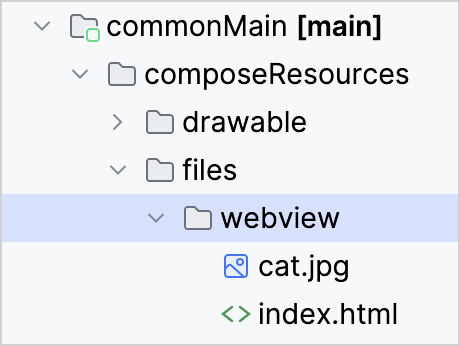
此範例中的兩個資源檔案都位於 commonMain 原始碼集中:
與其他程式庫和資源的互動
從外部程式庫存取多平台資源
如果您想使用專案中包含的其他程式庫來處理多平台資源,您可以將平台特定的檔案路徑傳遞給這些其他 API。 要獲取平台特定的路徑,請使用資源的專案路徑呼叫 Res.getUri() 函式:
val uri = Res.getUri("files/my_video.mp4")現在 uri 變數包含了檔案的絕對路徑,任何外部程式庫都可以使用該路徑以適合其的方式存取檔案。
對於 Android 特定用途,多平台資源也會 打包為 Android assets。
遠端檔案
在資源程式庫的語境下,只有作為應用程式一部分的檔案才被視為資源。
您可以使用專門的程式庫透過 URL 從網際網路載入遠端檔案:
使用 Java 資源
雖然您可以在 Compose Multiplatform 中使用 Java 資源,但它們無法享受架構提供的擴展功能:產生的存取子、多模組支援、在地化等等。 請考慮完全過渡到多平台資源程式庫以發揮這些潛力。
在 Compose Multiplatform 1.7.0 中,compose.ui 套件中提供的資源 API 已被棄用。 如果您仍然需要處理 Java 資源,請將以下實作複製到您的專案中,以確保您的程式碼在升級到 Compose Multiplatform 1.7.0 或更高版本後仍能運作:
@Composable
internal fun painterResource(
    resourcePath: String
): Painter = when (resourcePath.substringAfterLast(".")) {
    "svg" -> rememberSvgResource(resourcePath)
    "xml" -> rememberVectorXmlResource(resourcePath)
    else -> rememberBitmapResource(resourcePath)
}

@Composable
internal fun rememberBitmapResource(path: String): Painter {
    return remember(path) { BitmapPainter(readResourceBytes(path).decodeToImageBitmap()) }
}

@Composable
internal fun rememberVectorXmlResource(path: String): Painter {
    val density = LocalDensity.current
    val imageVector = remember(density, path) { readResourceBytes(path).decodeToImageVector(density) }
    return rememberVectorPainter(imageVector)
}

@Composable
internal fun rememberSvgResource(path: String): Painter {
    val density = LocalDensity.current
    return remember(density, path) { readResourceBytes(path).decodeToSvgPainter(density) }
}

private object ResourceLoader
private fun readResourceBytes(resourcePath: String) =
    ResourceLoader.javaClass.classLoader.getResourceAsStream(resourcePath).readAllBytes()