
使用 Swift export 與 Swift 互通
Kotlin 透過 Swift export 與 Swift 互通的功能目前處於 Alpha 階段。Swift export 允許您直接匯出 Kotlin 原始碼,並以慣用的方式從 Swift 呼叫 Kotlin 程式碼,不需要 Objective-C 標頭檔。
Swift export 讓針對 Apple 目標的多平台開發更加精簡。例如,如果您有一個包含頂層函式的 Kotlin 模組,Swift export 可以實現乾淨且模組特定的匯入,移除了令人困惑的 Objective-C 底線和修飾名 (mangled names)。
目前的 Swift export 特性包括:
- 多模組支援。每個 Kotlin 模組都會被匯出為一個獨立 accessor Swift 模組,簡化了函式呼叫。
- 套件支援。Kotlin 套件在匯出期間會被明確保留,避免在產生的 Swift 程式碼中發生命名衝突。
- 型別別名。Kotlin 型別別名會被匯出並保留在 Swift 中,提高可讀性。
- 增強型基本型別的可 null 性。與 Objective-C 互通性不同(後者需要將
Int?等型別裝箱到KotlinInt等包裝類別中以保留可 null 性),Swift export 會直接轉換可 null 性資訊。 - 多載。您可以在 Swift 中呼叫 Kotlin 的多載函式而不會產生歧義。
- 扁平化套件結構。您可以將 Kotlin 套件轉換為 Swift 列舉,從產生的 Swift 程式碼中移除套件前綴。
- 模組名稱自訂。您可以在 Kotlin 專案的 Gradle 配置中自訂產生的 Swift 模組名稱。
- 並行支援。您可以從 Swift 無縫呼叫 Kotlin 的暫停函式,並能開箱即用地將
kotlinx.coroutinesflows 匯出為 Swift 的AsyncSequence。
啟用 Swift export
Swift export 目前處於 Alpha 階段且尚不完整,因此預期會有重大變更。若要嘗試,請在您的 Kotlin 專案中 設定建置檔案,並 設定 Xcode 以整合 Swift export。
設定 Kotlin 專案
您可以使用專案中的以下建置檔案作為設定 Swift export 的起點:
// build.gradle.kts
kotlin {

    iosArm64()
    iosSimulatorArm64()

    swiftExport {
        // 設定根模組名稱
        moduleName = "Shared"

        // 設定收合規則
        // 從產生的 Swift 程式碼中移除套件前綴
        flattenPackage = "com.example.sandbox"

        // 配置外部模組匯出
        export(project(":subproject")) {
            // 設定匯出模組的名稱
            moduleName = "Subproject"
            // 設定匯出相依項的收合規則
            flattenPackage = "com.subproject.library"
        }

        // 為連結任務提供編譯器引數
        configure {
            freeCompilerArgs.add("-Xexpect-actual-classes")
        }
    }
}
Kotlin 編譯器會自動產生所有必要的檔案(包括 swiftmodule 檔案、靜態 .a 程式庫、標頭檔和 modulemap 檔案),並將它們複製到應用程式的組建目錄中,您可以從 Xcode 存取該目錄。
您也可以複製我們已經設定好 Swift export 的 公開範例。
設定 Xcode 專案
若要配置 Xcode 以將 Swift export 整合到您的專案中:
在 Xcode 中,開啟專案設定。
在 Build Phases 索引標籤上,找到包含
embedAndSignAppleFrameworkForXcode任務的 Run Script 階段。將該階段的指令碼取代為
embedSwiftExportForXcode任務:bash./gradlew :<Shared module name>:embedSwiftExportForXcode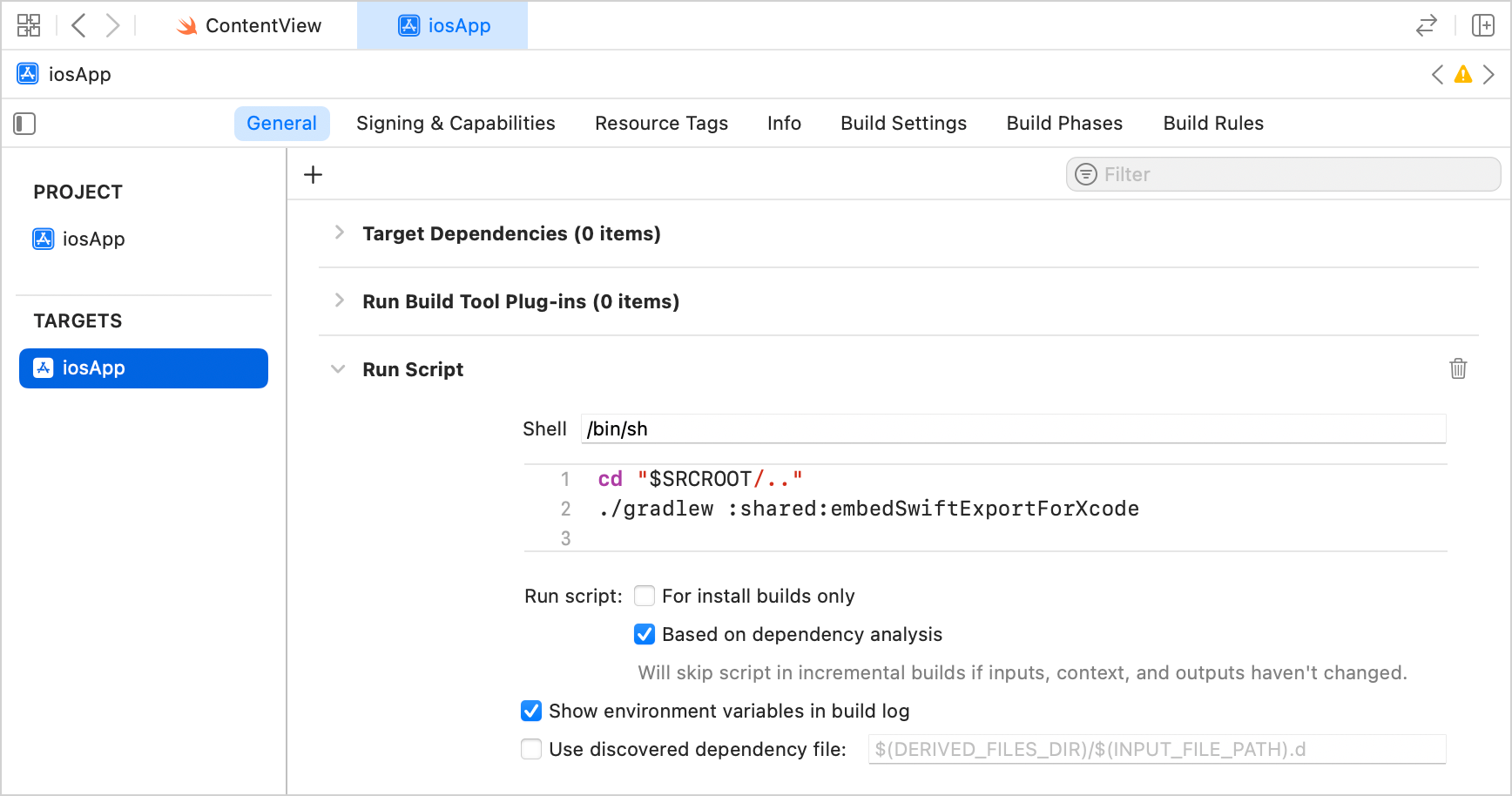
組建專案。建置過程會在輸出目錄中產生 Swift 模組。
目前限制
Swift export 目前僅適用於使用 直接整合 將 iOS 框架連接到 Xcode 專案的專案。這是使用 IntelliJ IDEA 中的 Kotlin Multiplatform 外掛程式或透過 Web 精靈 建立的 Kotlin Multiplatform 專案的標準配置。
其他已知問題:
繼承自
List、Set或Map的型別在匯出期間會被忽略 (KT-80416)。List、Set或Map的繼承者無法在 Swift 側具現化 (KT-80417)。匯出到 Swift 時,Kotlin 泛型型別參數會被型別擦除為其上界 (upper bounds)。
不支援跨語言繼承,因此 Swift 類別不能直接繼承自 Kotlin 匯出的類別或介面。
目前沒有 IDE 遷移提示或自動化功能。
當使用需要選擇性加入 (opt-in) 的宣告時,您必須在 Gradle 建置檔案的「模組層級」新增明確的
optIn編譯器選項。例如,對於kotlinx.datetime程式庫:kotlinswiftExport { moduleName = "Shared" export("org.jetbrains.kotlinx:kotlinx-datetime:0.8.0") { moduleName = "KotlinDateTime" flattenPackage = "kotlinx.datetime" } } // 在模組層級新增一個獨立的 opt-in 區塊 compilerOptions { optIn.add("kotlin.time.ExperimentalTime") }
對應
下表顯示了 Kotlin 概念如何對應到 Swift。
| Kotlin | Swift |
|---|---|
class | class |
object | 具有 shared 屬性的 class |
enum class | enum |
typealias | typealias |
| 函式 | 函式 |
suspend fun | async |
kotlinx.coroutines flows | AsyncSequence |
| 屬性 | 屬性 |
| 建構函式 | 初始設定式 |
| 套件 | 巢狀列舉 |
Boolean | Bool |
Char | Unicode.UTF16.CodeUnit |
Byte | Int8 |
Short | Int16 |
Int | Int32 |
Long | Int64 |
UByte | UInt8 |
UShort | UInt16 |
UInt | UInt32 |
ULong | UInt64 |
Float | Float |
Double | Double |
Any | KotlinBase 類別 |
Unit | Void |
Nothing | Never |
宣告
類別 (Classes)
Swift export 僅支援直接繼承自 Any 的 final 類別,例如 class Foo()。它們會被轉換為繼承自特殊 KotlinBase 類別的 Swift 類別:
// Kotlin
class MyClass {
    val property: Int = 0

    fun method() {}
}// Swift
public class MyClass : KotlinRuntime.KotlinBase {
public var property: Swift.Int32 {
get {
// ...
}
}
public override init() {
// ...
}
public func method() -> Swift.Void {
// ...
}
}物件 (Objects)
物件會被轉換為具有私有 init 和靜態 shared 存取子的 Swift 類別:
// Kotlin
object O// Swift
public class O : KotlinRuntime.KotlinBase {
public static var shared: O {
get {
// ...
}
}
private override init() {
// ...
}
}型別別名 (Type aliases)
Kotlin 型別別名會原樣匯出:
// Kotlin
typealias MyInt = Int// Swift
public typealias MyInt = Swift.Int32列舉 (Enums)
Kotlin enum class 宣告會被匯出為一般的原生 Swift enum 型別:
// Kotlin
enum class Color(val rgb: Int) {
    RED(0xFF0000),
    GREEN(0x00FF00),
    BLUE(0x0000FF)
}

val color = Color.RED// Swift
public enum Color: Swift.CaseIterable, Swift.LosslessStringConvertible, Swift.RawRepresentable {
case RED, GREEN, BLUE
public var rgb: Swift.Int32 { get }
}函式 (Functions)
Swift export 支援簡單的頂層函式與方法:
// Kotlin
fun foo(a: Short, b: Bar) {}

fun baz(): Long = 0// Swift
public func foo(a: Swift.Int16, b: Bar) -> Swift.Void {
// ...
}
public func baz() -> Swift.Int64 {
// ...
}對於 Kotlin 的擴充函式,接收者參數會變成第一個位置的普通 Swift 參數:
// Kotlin
fun Int.foo(): Unit = TODO()// Swift
func foo(_ receiver: Int32) {}Kotlin 帶有 vararg 的函式會對應到 Swift 的可變參數函式參數:
// Kotlin
fun log(vararg messages: String)// Swift
public func log(messages: Swift.String...)
- 目前對帶有
operator修飾元 的函式支援有限。- 通常不支援泛型型別。
屬性 (Properties)
Kotlin 屬性會被轉換為 Swift 屬性:
// Kotlin
val a: Int = 0

var b: Short = 15

const val c: Int = 0// Swift
public var a: Swift.Int32 {
get {
// ...
}
}
public var b: Swift.Int16 {
get {
// ...
}
set {
// ...
}
}
public var c: Swift.Int32 {
get {
// ...
}
}建構函式 (Constructors)
建構函式會被轉換為 Swift 初始設定式:
// Kotlin
class Foo(val prop: Int)// Swift
public class Foo : KotlinRuntime.KotlinBase {
public init(
prop: Swift.Int32
) {
// ...
}
}型別
kotlin.Nothing
Kotlin Nothing 型別會被轉換為 Never 型別:
// Kotlin
fun foo(): Nothing = TODO()

fun baz(input: Nothing) {}// Swift
public func foo() -> Swift.Never {
// ...
}
public func baz(input: Swift.Never) -> Void {
// ...
}分類器型別 (Classifier types)
Swift export 目前僅支援直接繼承自 Any 的 final 類別。
套件 (Packages)
Kotlin 套件會被轉換為巢狀 Swift 列舉以避免名稱衝突:
// Kotlin
// foo.bar 套件中的 bar.kt 檔案
fun callMeMaybe() {}// Kotlin
// foo.baz 套件中的 baz.kt 檔案
fun callMeMaybe() {}// Swift
public extension foo.bar {
public func callMeMaybe() {}
}
public extension foo.baz {
public func callMeMaybe() {}
}
public enum foo {
public enum bar {}
public enum baz {}
}並行 (Concurrency)
暫停函式 (Suspending functions)
您可以從 Swift 呼叫 Kotlin 的暫停函式。Kotlin 暫停函式和暫停功能型別會被匯出為 Swift 相對應的 async 版本:
// Kotlin
suspend fun hello(): String {
    delay(1000)
    return "Hello Swift! This is Kotlin."
}// Swift
let msg = try await hello()Flows
您也可以將 kotlinx.coroutines flows 匯出為 Swift 的 AsyncSequence:
// Kotlin
// 匯出 Flow 時保留 String 型別
fun flowOfStrings(): Flow<String> = flowOf("hello", "any", "world")// Swift
var actual: [String] = []
// 從 Kotlin 推論 String 型別
for try await element in flowOfStrings().asAsyncSequence() {
actual.append(element)
}協程分派器 (Coroutine dispatchers)
預設情況下,當您從 Swift 呼叫 Kotlin 暫停函式或使用 asAsyncSequence 函式時,Kotlin 會建立一個使用 Dispatchers.Default 分派器的協程上下文,並在該處執行匯出的程式碼。
若要在不同的分派器上執行匯出的程式碼,請使用 withContext() 函式在 Kotlin 中切換協程上下文。例如:
suspend fun runOnMain(): Int = withContext(Dispatchers.Main) {
    delay(10L)
    42
}
Swift export 的演進
我們計劃在未來的 Kotlin 版本中擴展並逐步穩定 Swift export,改善 Kotlin 與 Swift 之間的互通性。您可以留下您的回饋:
- 在 Kotlin Slack 中 – 獲取邀請 並加入 #swift-export 頻道。
- 在 YouTrack 中回報問題。