
Kotlin 自定义脚本入门 – 教程
Kotlin 自定义脚本目前处于实验性阶段。它可能随时被丢弃或更改。 请仅出于评估目的使用它。我们欢迎你在 YouTrack 中提供反馈。
Kotlin 脚本是一项无需事先编译或打包为可执行文件即可将 Kotlin 代码作为脚本执行的技术。
有关 Kotlin 脚本的概述和示例,请查看 Rodrigo Oliveira 在 KotlinConf'19 上的演讲 Implementing the Gradle Kotlin DSL。
在本教程中,你将创建一个能执行带有 Maven 依赖项的任意 Kotlin 代码的 Kotlin 脚本项目。你将能够执行如下脚本:
@file:Repository("https://maven.pkg.jetbrains.space/public/p/kotlinx-html/maven")
@file:DependsOn("org.jetbrains.kotlinx:kotlinx-html-jvm:0.7.3")

import kotlinx.html.*
import kotlinx.html.stream.*
import kotlinx.html.attributes.*

val addressee = "World"

print(
    createHTML().html {
        body {
            h1 { +"Hello, $addressee!" }
        }
    }
)
指定的 Maven 依赖项(本例中为 kotlinx-html-jvm)将在执行期间从指定的 Maven 仓库或本地缓存中解析,并用于脚本的其余部分。
项目结构
一个最小的 Kotlin 自定义脚本项目包含两部分:
- 脚本定义 – 一组定义此脚本类型应如何被识别、处理、编译和执行的参数和配置。
- 脚本宿主 – 处理脚本编译和执行的应用程序或组件——实际运行此类脚本。
基于以上考虑,最好将项目拆分为两个模块。
开始之前
下载并安装最新版本的 IntelliJ IDEA。
创建项目
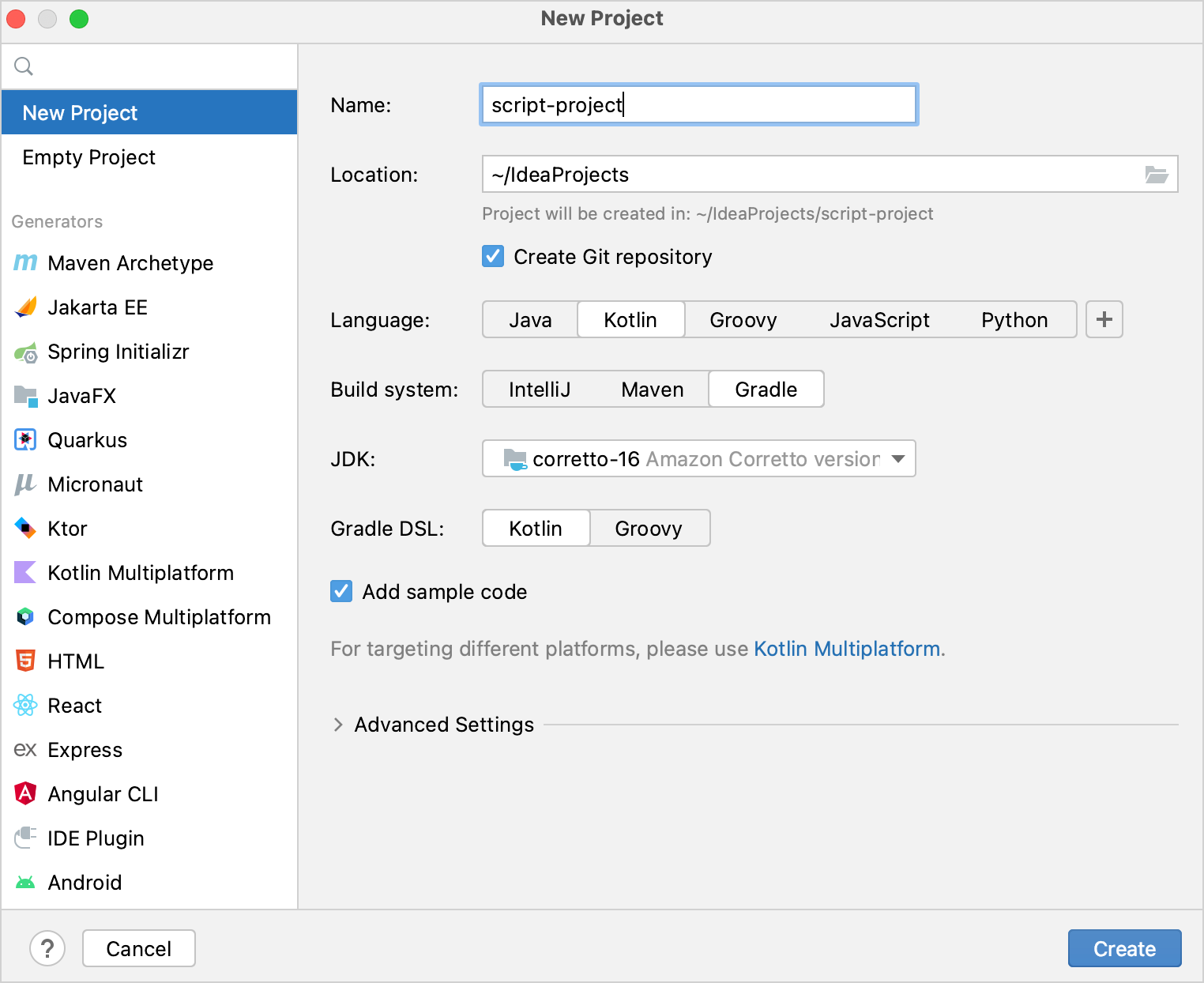
在 IntelliJ IDEA 中,选择 File | New | Project。
在左侧面板中,选择 New Project。
为新项目命名,并根据需要更改其位置。
选中 Create Git repository 复选框以将新项目置于版本控制之下。你也可以稍后随时执行此操作。
在 Language 列表中,选择 Kotlin。
选择 Gradle 构建系统。
从 JDK 列表中,选择要在项目中使用的 JDK。
- 如果你的计算机上已安装 JDK,但在 IDE 中未定义,请选择 Add JDK 并指定 JDK 根目录的路径。
- 如果你的计算机上没有必要的 JDK,请选择 Download JDK。
为 Gradle DSL 选择 Kotlin 或 Gradle 语言。
点击 Create。
添加脚本模块
现在你拥有一个空的 Kotlin/JVM Gradle 项目。添加所需的模块:脚本定义和脚本宿主。
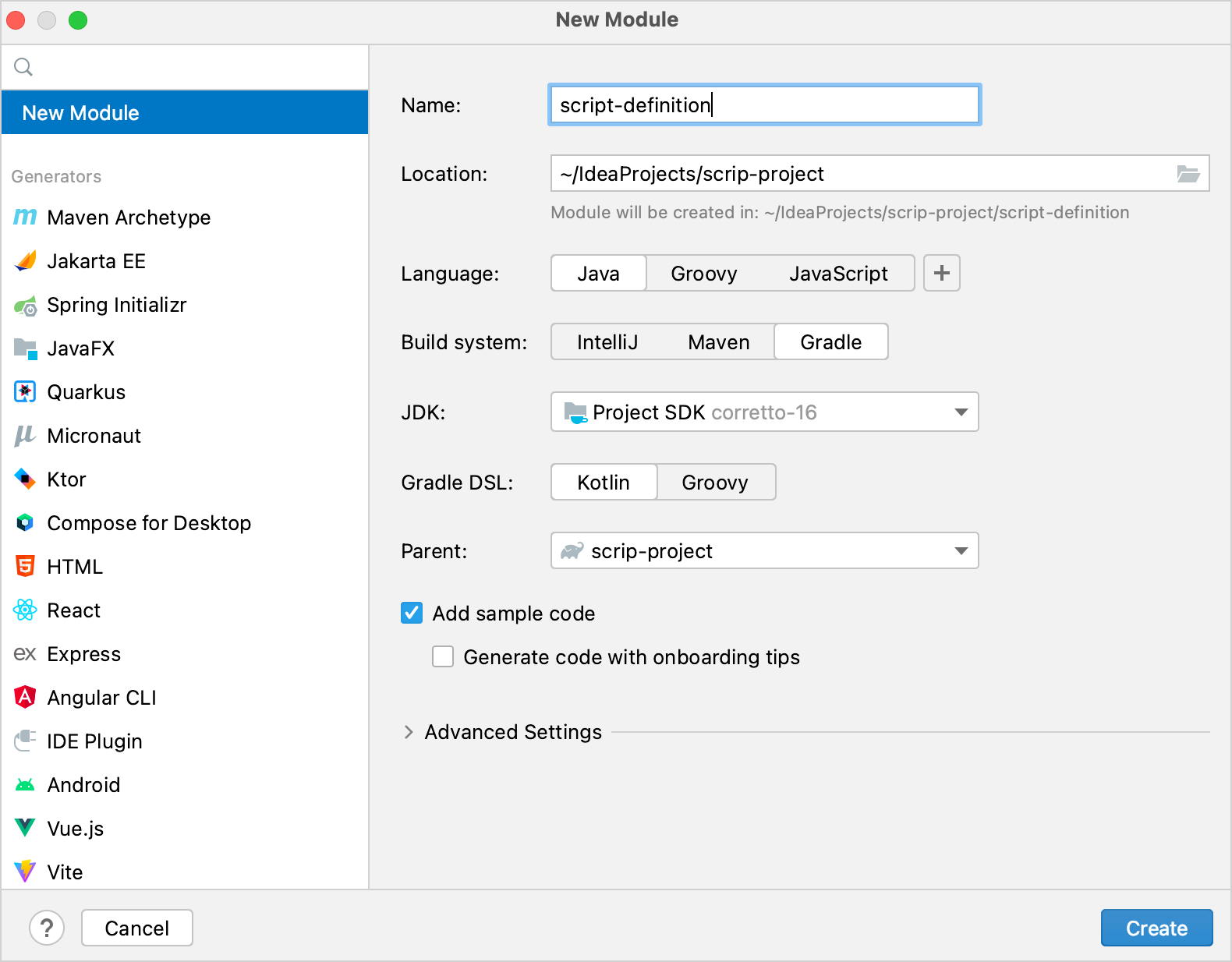
在 IntelliJ IDEA 中,选择 File | New | Module。
在左侧面板中,选择 New Module。该模块将作为脚本定义。
为新模块命名,并根据需要更改其位置。
从 Language 列表中,选择 Java。
选择 Gradle 构建系统;如果你想用 Kotlin 编写构建脚本,请为 Gradle DSL 选择 Kotlin。
选择根模块作为模块的父模块。
点击 Create。
在模块的
build.gradle(.kts)文件中,移除 Kotlin Gradle 插件的version。它已经存在于根项目的构建脚本中。再次重复上述步骤,为脚本宿主创建一个模块。
项目应具有以下结构:
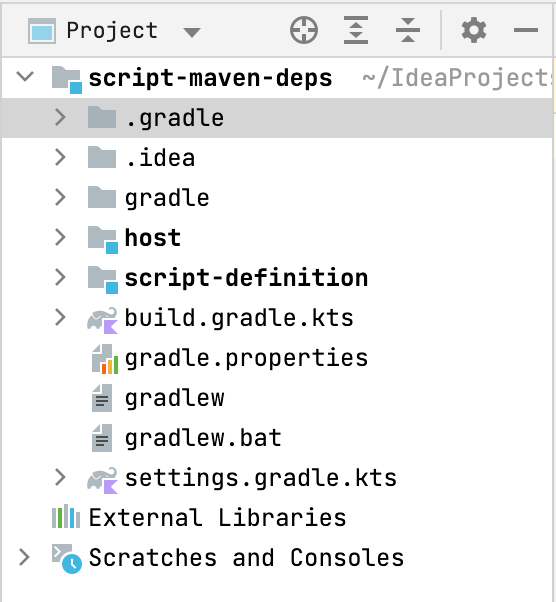
你可以在 kotlin-script-examples GitHub 仓库中找到此类项目的示例以及更多 Kotlin 脚本示例。
创建脚本定义
首先,定义脚本类型:开发者可以在此类脚本中编写什么,以及它将如何被处理。在本教程中,这包括在脚本中支持 @Repository 和 @DependsOn 注解。
在脚本定义模块中,在
build.gradle(.kts)的dependencies块中添加对 Kotlin 脚本组件的依赖项。这些依赖项提供了脚本定义所需的 API:kotlindependencies { implementation("org.jetbrains.kotlin:kotlin-scripting-common") implementation("org.jetbrains.kotlin:kotlin-scripting-jvm") implementation("org.jetbrains.kotlin:kotlin-scripting-dependencies") implementation("org.jetbrains.kotlin:kotlin-scripting-dependencies-maven") // 此特定定义需要协程依赖项 implementation("org.jetbrains.kotlinx:kotlinx-coroutines-core:1.11.0") }groovydependencies { implementation 'org.jetbrains.kotlin:kotlin-scripting-common' implementation 'org.jetbrains.kotlin:kotlin-scripting-jvm' implementation 'org.jetbrains.kotlin:kotlin-scripting-dependencies' implementation 'org.jetbrains.kotlin:kotlin-scripting-dependencies-maven' // 此特定定义需要协程依赖项 implementation 'org.jetbrains.kotlinx:kotlinx-coroutines-core:1.11.0' }在模块中创建
src/main/kotlin/目录,并添加一个 Kotlin 源文件,例如scriptDef.kt。在
scriptDef.kt中创建一个类。它将作为此类脚本的超类,因此请将其声明为abstract或open。kotlin// 此类脚本的抽象(或 open)超类 abstract class ScriptWithMavenDeps这个类稍后还将作为脚本定义的引用。
为了将该类设为脚本定义,请使用
@KotlinScript注解对其进行标记。向该注解传递两个参数:fileExtension– 以.kts结尾的字符串,定义此类脚本的文件扩展名。compilationConfiguration– 一个继承自ScriptCompilationConfiguration的 Kotlin 类,定义此脚本定义的编译细节。你将在下一步中创建它。
kotlin// @KotlinScript 注解标记脚本定义类 @KotlinScript( // 脚本类型的文件扩展名 fileExtension = "scriptwithdeps.kts", // 脚本类型的编译配置 compilationConfiguration = ScriptWithMavenDepsConfiguration::class ) abstract class ScriptWithMavenDeps object ScriptWithMavenDepsConfiguration: ScriptCompilationConfiguration()在本教程中,我们仅提供工作代码,不详细解释 Kotlin 脚本 API。你可以在 GitHub 上找到带有详细说明的相同代码。
按如下所示定义脚本编译配置。
kotlinobject ScriptWithMavenDepsConfiguration : ScriptCompilationConfiguration( { // 此类所有脚本的隐式导入 defaultImports(DependsOn::class, Repository::class) jvm { // 从上下文类加载器中提取整个类路径并将其用作依赖项 dependenciesFromCurrentContext(wholeClasspath = true) } // 回调 refineConfiguration { // 使用提供的处理程序处理指定的注解 onAnnotations(DependsOn::class, Repository::class, handler = ::configureMavenDepsOnAnnotations) } } )configureMavenDepsOnAnnotations函数如下:kotlin// 实时重新配置编译的处理程序 fun configureMavenDepsOnAnnotations(context: ScriptConfigurationRefinementContext): ResultWithDiagnostics<ScriptCompilationConfiguration> { val annotations = context.collectedData?.get(ScriptCollectedData.collectedAnnotations)?.takeIf { it.isNotEmpty() } ?: return context.compilationConfiguration.asSuccess() return runBlocking { resolver.resolveFromScriptSourceAnnotations(annotations) }.onSuccess { context.compilationConfiguration.with { dependencies.append(JvmDependency(it)) }.asSuccess() } } private val resolver = CompoundDependenciesResolver(FileSystemDependenciesResolver(), MavenDependenciesResolver())你可以在此处找到完整代码。
创建脚本宿主
下一步是创建脚本宿主——处理脚本执行的组件。
在脚本宿主模块中,在
build.gradle(.kts)的dependencies块中添加依赖项:- 提供脚本宿主所需 API 的 Kotlin 脚本组件
- 你之前创建的脚本定义模块
kotlindependencies { implementation("org.jetbrains.kotlin:kotlin-scripting-common") implementation("org.jetbrains.kotlin:kotlin-scripting-jvm") implementation("org.jetbrains.kotlin:kotlin-scripting-jvm-host") implementation(project(":script-definition")) // 脚本定义模块 }groovydependencies { implementation 'org.jetbrains.kotlin:kotlin-scripting-common' implementation 'org.jetbrains.kotlin:kotlin-scripting-jvm' implementation 'org.jetbrains.kotlin:kotlin-scripting-jvm-host' implementation project(':script-definition') // 脚本定义模块 }在模块中创建
src/main/kotlin/目录,并添加一个 Kotlin 源文件,例如host.kt。为应用程序定义
main函数。在其主体中,检查它是否有一个参数(脚本文件的路径),并执行该脚本。你将在下一步的单独函数evalFile中定义脚本执行。现在先将其声明为空。main可能看起来像这样:kotlinfun main(vararg args: String) { if (args.size != 1) { println("usage: <app> <script file>") } else { val scriptFile = File(args[0]) println("Executing script $scriptFile") evalFile(scriptFile) } }定义脚本评估函数。这是你将使用脚本定义的地方。通过调用
createJvmCompilationConfigurationFromTemplate并将脚本定义类作为类型参数来获取它。然后调用BasicJvmScriptingHost().eval,向其传递脚本代码及其编译配置。eval返回ResultWithDiagnostics的实例,因此将其设置为函数的返回类型。kotlinfun evalFile(scriptFile: File): ResultWithDiagnostics<EvaluationResult> { val compilationConfiguration = createJvmCompilationConfigurationFromTemplate<ScriptWithMavenDeps>() return BasicJvmScriptingHost().eval(scriptFile.toScriptSource(), compilationConfiguration, null) }调整
main函数以打印有关脚本执行的信息:kotlinfun main(vararg args: String) { if (args.size != 1) { println("usage: <app> <script file>") } else { val scriptFile = File(args[0]) println("Executing script $scriptFile") val res = evalFile(scriptFile) res.reports.forEach { if (it.severity > ScriptDiagnostic.Severity.DEBUG) { println(" : ${it.message}" + if (it.exception == null) "" else ": ${it.exception}") } } } }
你可以在此处找到完整代码。
运行脚本
为了检查你的脚本宿主如何工作,请准备一个要执行的脚本和一个运行配置。
在项目根目录中创建文件
html.scriptwithdeps.kts,内容如下:kotlin@file:Repository("https://maven.pkg.jetbrains.space/public/p/kotlinx-html/maven") @file:DependsOn("org.jetbrains.kotlinx:kotlinx-html-jvm:0.7.3") import kotlinx.html.*; import kotlinx.html.stream.*; import kotlinx.html.attributes.* val addressee = "World" print( createHTML().html { body { h1 { +"Hello, $addressee!" } } } )它使用了来自
kotlinx-html-jvm库的函数,该库在@DependsOn注解参数中被引用。创建一个启动脚本宿主并执行此文件的运行配置:
打开
host.kt并导航到main函数。其左侧有一个 Run 装订区域图标。右键点击该装订区域图标,然后选择 Modify Run Configuration。
在 Create Run Configuration 对话框中,将脚本文件名添加到 Program arguments,然后点击 OK。
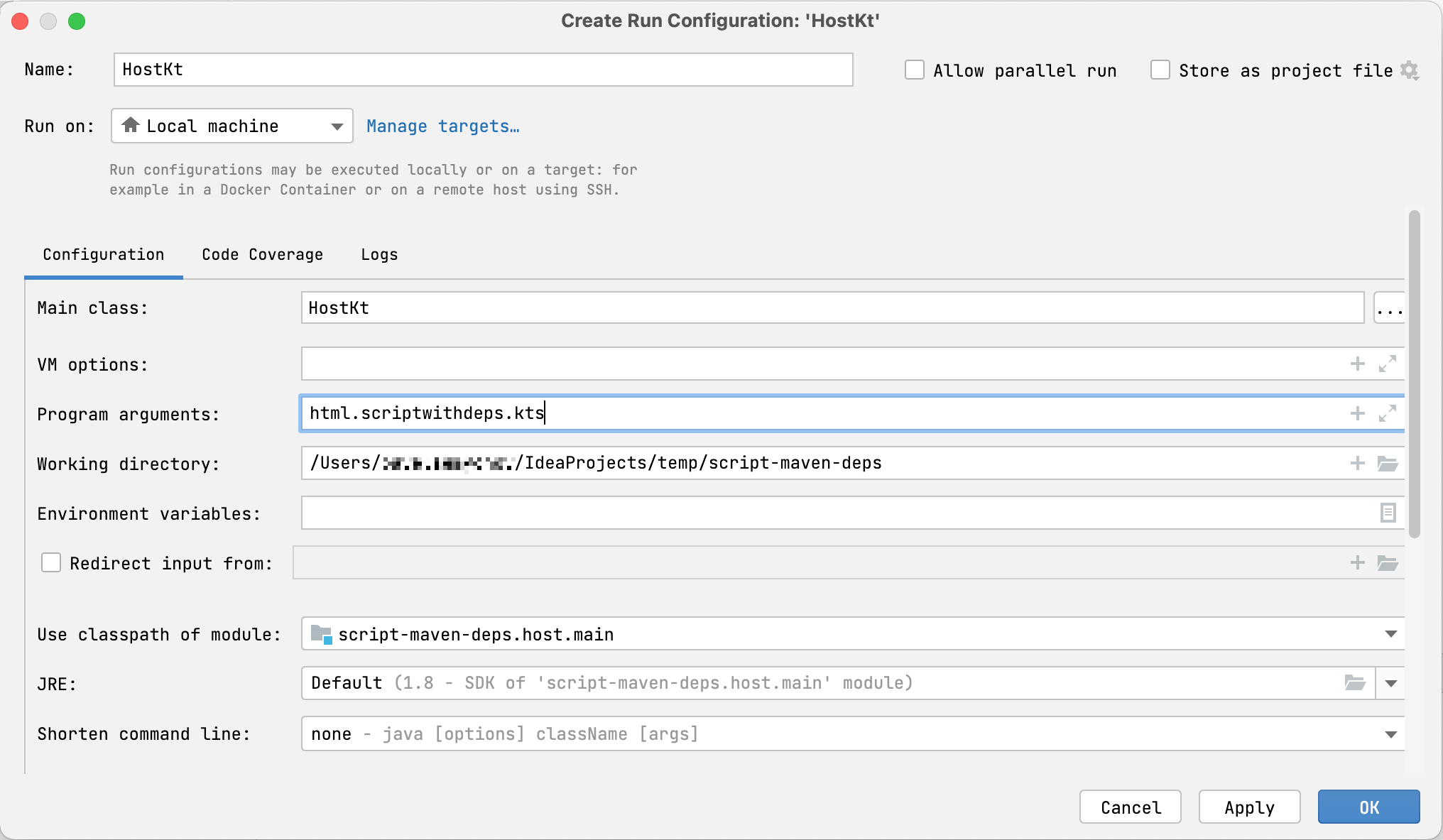
运行创建的配置。
你将看到脚本是如何执行的,它会解析指定仓库中对 kotlinx-html-jvm 的依赖,并打印调用其函数的结果:
<html>
  <body>
    <h1>Hello, World!</h1>
  </body>
</html>
第一次运行时解析依赖项可能需要一些时间。后续运行速度会快得多,因为它们使用从本地 Maven 仓库下载的依赖项。
下一步
创建简单的 Kotlin 脚本项目后,可以查找有关此主题的更多信息:
- 阅读 Kotlin 脚本 KEEP
- 浏览更多 Kotlin 脚本示例
- 观看 Rodrigo Oliveira 的演讲 Implementing the Gradle Kotlin DSL