
为 Spring Boot 项目添加数据库支持
这是使用 Spring Boot 和 Kotlin 入门教程的第三部分。在继续之前,请确保您已完成之前的步骤:
 使用 Kotlin 创建 Spring Boot 项目
 为 Spring Boot 项目添加数据类
 为 Spring Boot 项目添加数据库支持
 使用 Spring Data CrudRepository 进行数据库访问
在本部分教程中,您将使用 Java Database Connectivity (JDBC) 为项目添加并配置数据库。 在 JVM 应用程序中,您可以使用 JDBC 与数据库进行交互。 为了方便起见,Spring 框架提供了 JdbcTemplate 类,它可以简化 JDBC 的使用并有助于避免常见错误。
添加数据库支持
在基于 Spring 框架的应用程序中,通用的做法是在所谓的 service(服务)层中实现数据库访问逻辑——这就是业务逻辑所在的地方。 在 Spring 中,您应该使用 @Service 注解标记类,以暗示该类属于应用程序的服务层。 在此应用程序中,您将为此目的创建 MessageService 类。
在同一个软件包中,创建 MessageService.kt 文件和 MessageService 类,内容如下:
// MessageService.kt
package com.example.demo

import org.springframework.stereotype.Service
import org.springframework.jdbc.core.JdbcTemplate

@Service
class MessageService(private val db: JdbcTemplate) {
    fun findMessages(): List<Message> = db.query("select * from messages") { response, _ ->
        Message(response.getString("id"), response.getString("text"))
    }

    fun save(message: Message): Message {
        db.update(
            "insert into messages values ( ?, ? )",
            message.id, message.text
        )
        return message
    }
}
构造函数参数与依赖注入 – (private val db: JdbcTemplate)
Kotlin 中的类有一个主构造函数。它还可以有一个或多个次要构造函数。 主构造函数是类标头的一部分,位于类名和可选的类型形参之后。在我们的案例中,构造函数是 (val db: JdbcTemplate)。
val db: JdbcTemplate 是构造函数的实参:
尾随 Lambda 与 SAM 转换
findMessages() 函数调用 JdbcTemplate 类的 query() 函数。query() 函数接收两个实参:一个作为字符串实例的 SQL 查询,以及一个将每行映射为一个对象的毁调函数:
RowMapper 接口只声明了一个方法,因此可以通过省略接口名称的 lambda表达式 来实现它。Kotlin 编译器知道 lambda表达式 需要转换成的接口,因为您将其用作函数调用的参数。这被称为 Kotlin 中的 SAM 转换:
在 SAM 转换之后,查询函数最终得到两个实参:第一个位置的字符串,以及最后一个位置的 lambda表达式。根据 Kotlin 约定,如果函数的最后一个参数是函数,那么作为相应实参传递的 lambda表达式 可以放在圆括号之外。这种语法也被称为 尾随 Lambda:
用于未使用 Lambda 参数的下划线
对于具有多个形参的 Lambda,您可以使用下划线 _ 字符来替换您不使用的形参名称。
因此,查询函数调用的最终语法如下所示:
更新 MessageController 类
更新 MessageController.kt 以使用新的 MessageService 类:
// MessageController.kt
package com.example.demo

import org.springframework.http.ResponseEntity
import org.springframework.web.bind.annotation.GetMapping
import org.springframework.web.bind.annotation.PostMapping
import org.springframework.web.bind.annotation.RequestBody
import org.springframework.web.bind.annotation.RequestMapping
import org.springframework.web.bind.annotation.RestController
import java.net.URI

@RestController
@RequestMapping("/")
class MessageController(private val service: MessageService) {
    @GetMapping
    fun listMessages() = service.findMessages()

    @PostMapping
    fun post(@RequestBody message: Message): ResponseEntity<Message> {
        val savedMessage = service.save(message)
        return ResponseEntity.created(URI("/${savedMessage.id}")).body(savedMessage)
    }
}
@PostMapping 注解
负责处理 HTTP POST 请求的方法需要使用 @PostMapping 注解进行注解。为了能够将作为 HTTP Body 内容发送的 JSON 转换为对象,您需要为函数实参使用 @RequestBody 注解。由于应用程序的类路径中包含 Jackson 库,转换会自动发生。
ResponseEntity
ResponseEntity 代表整个 HTTP 响应:状态码、标头和主体。
使用 created() 方法,您可以配置响应状态码 (201) 并设置位置标头,指示所创建资源的上下文路径。
更新 MessageService 类
Message 类的 id 被声明为可为 null 的字符串:
data class Message(val id: String?, val text: String)然而,在数据库中将 null 存储为 id 值是不正确的:您需要优雅地处理这种情况。
更新 MessageService.kt 文件的代码,以便在将消息存储到数据库中时,如果 id 为 null,则生成一个新值:
// MessageService.kt
package com.example.demo

import org.springframework.stereotype.Service
import org.springframework.jdbc.core.JdbcTemplate
import java.util.UUID

@Service
class MessageService(private val db: JdbcTemplate) {
    fun findMessages(): List<Message> = db.query("select * from messages") { response, _ ->
        Message(response.getString("id"), response.getString("text"))
    }

    fun save(message: Message): Message {
        val id = message.id ?: UUID.randomUUID().toString() // 如果为 null 则生成新 id
        db.update(
            "insert into messages values ( ?, ? )",
            id, message.text
        )
        return message.copy(id = id) // 返回带有新 id 的消息副本
    }
}
Elvis 运算符 – ?:
代码 message.id ?: UUID.randomUUID().toString() 使用了 Elvis 运算符(if-not-null-else 简写)?:。如果 ?: 左侧的表达式不为 null,则 Elvis 运算符返回它;否则,返回右侧的表达式。请注意,仅当左侧为 null 时,才会计算右侧的表达式。
应用程序代码已准备好与数据库配合工作。现在需要配置数据源。
配置数据库
在应用程序中配置数据库:
在
src/main/resources目录中创建schema.sql文件。它将存储数据库对象定义: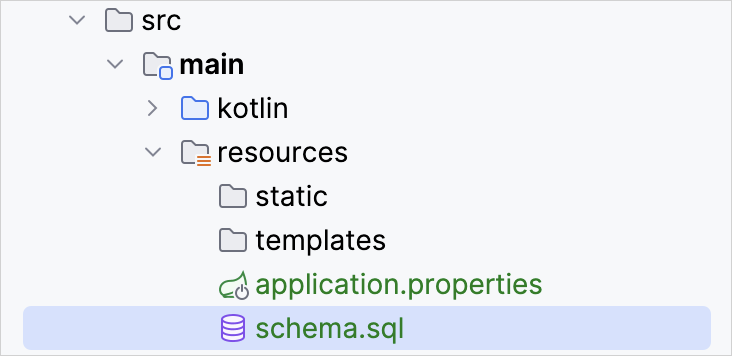
使用以下代码更新
src/main/resources/schema.sql文件:sql-- schema.sql CREATE TABLE IF NOT EXISTS messages ( id VARCHAR(60) PRIMARY KEY, text VARCHAR NOT NULL );它创建了具有两列的
messages表:id和text。表结构与Message类的结构相匹配。打开位于
src/main/resources文件夹中的application.properties文件,并添加以下应用程序属性:nonespring.application.name=demo spring.datasource.driver-class-name=org.h2.Driver spring.datasource.url=jdbc:h2:file:./data/testdb spring.datasource.username=name spring.datasource.password=password spring.sql.init.schema-locations=classpath:schema.sql spring.sql.init.mode=always这些设置将为 Spring Boot 应用程序启用数据库。
请在 Spring 文档中查看常用应用程序属性的完整列表。
通过 HTTP 请求向数据库添加消息
您应该使用 HTTP 客户端来操作之前创建的端点。在 IntelliJ IDEA 中,使用内置的 HTTP 客户端:
运行应用程序。一旦应用程序启动并运行,您就可以执行 POST 请求以将消息存储在数据库中。
在项目根文件夹中创建
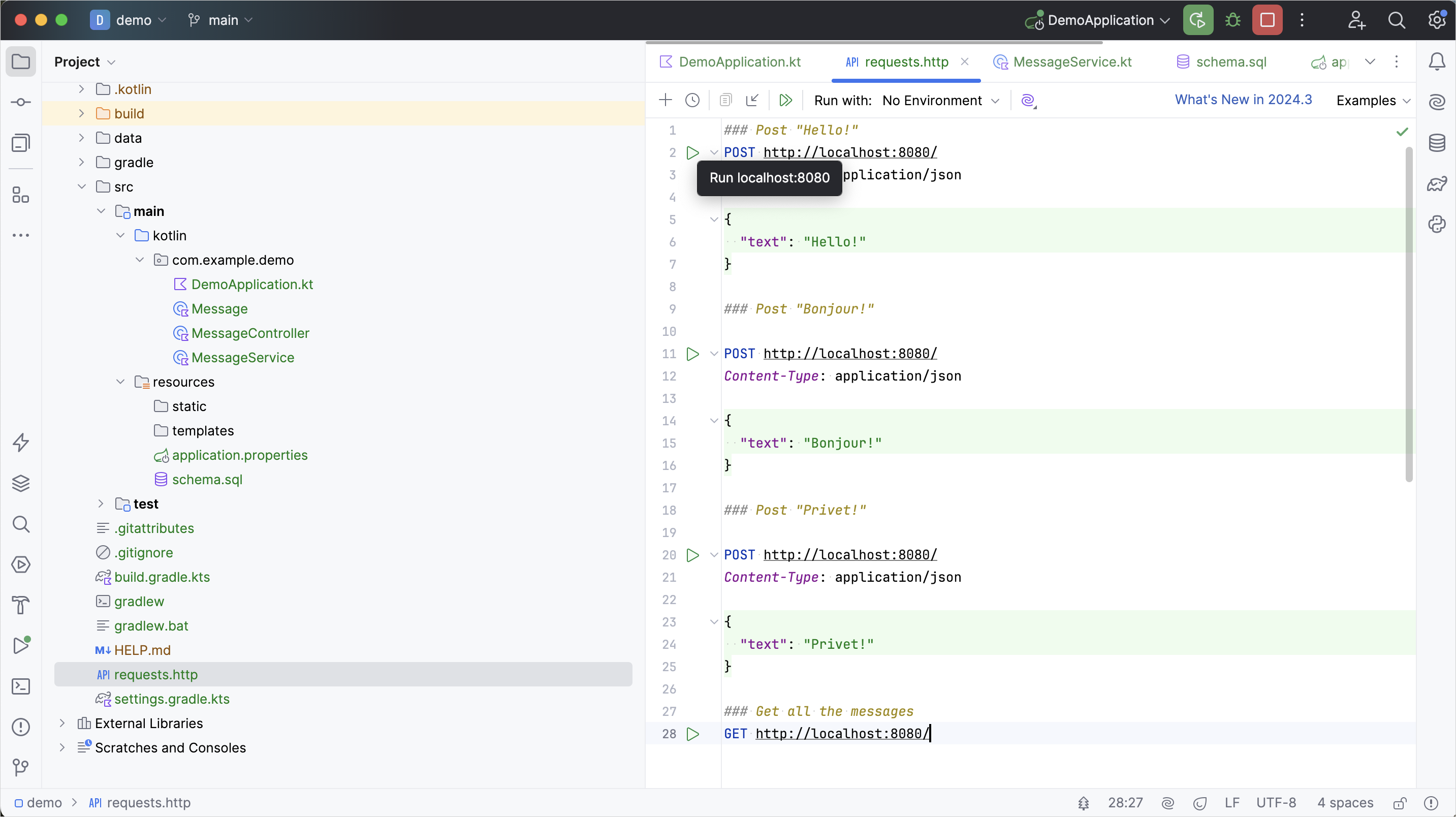
requests.http文件,并添加以下 HTTP 请求:http### Post "Hello!" POST http://localhost:8080/ Content-Type: application/json { "text": "Hello!" } ### Post "Bonjour!" POST http://localhost:8080/ Content-Type: application/json { "text": "Bonjour!" } ### Post "Privet!" POST http://localhost:8080/ Content-Type: application/json { "text": "Privet!" } ### Get all the messages GET http://localhost:8080/执行所有 POST 请求。使用请求声明旁边装订区域中的绿色 运行 图标。 这些请求将文本消息写入数据库:
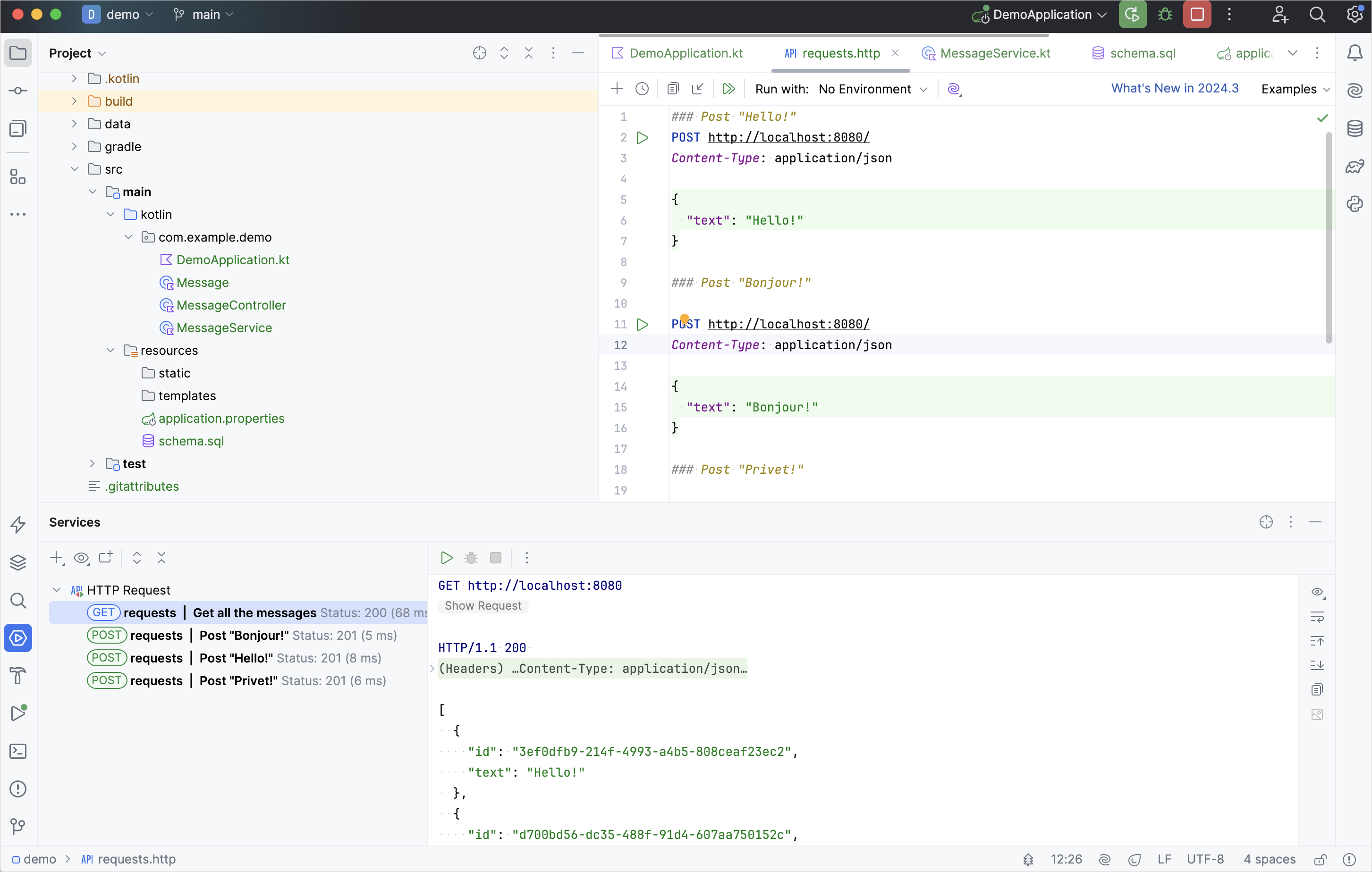
执行 GET 请求并在 运行 工具窗口中查看结果:
执行请求的其他方式
您也可以使用任何其他 HTTP 客户端或 cURL 命令行工具。例如,在终端中运行以下命令以获得相同的结果:
curl -X POST --location "http://localhost:8080" -H "Content-Type: application/json" -d "{ \"text\": \"Hello!\" }"

curl -X POST --location "http://localhost:8080" -H "Content-Type: application/json" -d "{ \"text\": \"Bonjour!\" }"

curl -X POST --location "http://localhost:8080" -H "Content-Type: application/json" -d "{ \"text\": \"Privet!\" }"

curl -X GET --location "http://localhost:8080"
通过 id 检索消息
扩展应用程序的功能,以通过 id 检索单个消息。
在
MessageService类中,添加新函数findMessageById(id: String)以通过 id 检索单个消息:kotlin// MessageService.kt package com.example.demo import org.springframework.stereotype.Service import org.springframework.jdbc.core.JdbcTemplate import org.springframework.jdbc.core.query import java.util.* @Service class MessageService(private val db: JdbcTemplate) { fun findMessages(): List<Message> = db.query("select * from messages") { response, _ -> Message(response.getString("id"), response.getString("text")) } fun findMessageById(id: String): Message? = db.query("select * from messages where id = ?", id) { response, _ -> Message(response.getString("id"), response.getString("text")) }.singleOrNull() fun save(message: Message): Message { val id = message.id ?: UUID.randomUUID().toString() // 如果为 null 则生成新 id db.update( "insert into messages values ( ?, ? )", id, message.text ) return message.copy(id = id) // 返回带有新 id 的消息副本 } }参数列表中 vararg 实参的位置
query()函数接收三个实参:- 运行所需的参数化 SQL 查询字符串
id,类型为 String 的实参RowMapper实例,由 lambda表达式 实现
query()函数的第二个形参被声明为可变实参 (vararg)。在 Kotlin 中,可变实参形参的位置并不要求位于参数列表的最后。singleOrNull() 函数
singleOrNull()函数返回单个元素,如果数组为空或具有多个相同值的元素,则返回null。用于通过 id 获取消息的
.query()函数是由 Spring 框架提供的 扩展函数。如上面的代码所示,它需要一个额外的导入import org.springframework.jdbc.core.query。在
MessageController类中添加带有id形参的新index(...)函数:kotlin// MessageController.kt package com.example.demo import org.springframework.http.ResponseEntity import org.springframework.web.bind.annotation.GetMapping import org.springframework.web.bind.annotation.PathVariable import org.springframework.web.bind.annotation.PostMapping import org.springframework.web.bind.annotation.RequestBody import org.springframework.web.bind.annotation.RequestMapping import org.springframework.web.bind.annotation.RestController import java.net.URI @RestController @RequestMapping("/") class MessageController(private val service: MessageService) { @GetMapping fun listMessages() = ResponseEntity.ok(service.findMessages()) @PostMapping fun post(@RequestBody message: Message): ResponseEntity<Message> { val savedMessage = service.save(message) return ResponseEntity.created(URI("/${savedMessage.id}")).body(savedMessage) } @GetMapping("/{id}") fun getMessage(@PathVariable id: String): ResponseEntity<Message> = service.findMessageById(id).toResponseEntity() private fun Message?.toResponseEntity(): ResponseEntity<Message> = // 如果消息为 null (未找到),将响应代码设为 404 this?.let { ResponseEntity.ok(it) } ?: ResponseEntity.notFound().build() }从上下文路径检索值
消息
id由 Spring 框架从上下文路径中检索,因为您使用@GetMapping("/{id}")对新函数进行了注解。通过使用@PathVariable注解函数实参,您告诉框架将检索到的值用作函数实参。新函数会调用MessageService以通过 id 检索单个消息。具有可为 null 接收者的扩展函数
可以使用可为 null 的接收者类型定义扩展。如果接收者为
null,那么this也为null。因此,在定义具有可为 null 接收者类型的扩展时,建议在函数体内执行this == null检查。您还可以使用安全调用运算符 (
?.) 来执行 null 检查,如上面的toResponseEntity()函数所示:kotlinResponseEntity
ResponseEntity代表 HTTP 响应,包括状态码、标头和主体。它是一个泛型包装器,允许您以更多对内容的控制权将自定义 HTTP 响应发送回客户端。
以下是应用程序的完整代码:
// DemoApplication.kt
package com.example.demo

import org.springframework.boot.autoconfigure.SpringBootApplication
import org.springframework.boot.runApplication

@SpringBootApplication
class DemoApplication

fun main(args: Array<String>) {
    runApplication<DemoApplication>(*args)
}// Message.kt
package com.example.demo
data class Message(val id: String?, val text: String)// MessageService.kt
package com.example.demo
import org.springframework.stereotype.Service
import org.springframework.jdbc.core.JdbcTemplate
import org.springframework.jdbc.core.query
import java.util.*
@Service
class MessageService(private val db: JdbcTemplate) {
fun findMessages(): List<Message> = db.query("select * from messages") { response, _ ->
Message(response.getString("id"), response.getString("text"))
}
fun findMessageById(id: String): Message? = db.query("select * from messages where id = ?", id) { response, _ ->
Message(response.getString("id"), response.getString("text"))
}.singleOrNull()
fun save(message: Message): Message {
val id = message.id ?: UUID.randomUUID().toString()
db.update(
"insert into messages values ( ?, ? )",
id, message.text
)
return message.copy(id = id)
}
}// MessageController.kt
package com.example.demo
import org.springframework.http.ResponseEntity
import org.springframework.web.bind.annotation.GetMapping
import org.springframework.web.bind.annotation.PathVariable
import org.springframework.web.bind.annotation.PostMapping
import org.springframework.web.bind.annotation.RequestBody
import org.springframework.web.bind.annotation.RequestMapping
import org.springframework.web.bind.annotation.RestController
import java.net.URI
@RestController
@RequestMapping("/")
class MessageController(private val service: MessageService) {
@GetMapping
fun listMessages() = ResponseEntity.ok(service.findMessages())
@PostMapping
fun post(@RequestBody message: Message): ResponseEntity<Message> {
val savedMessage = service.save(message)
return ResponseEntity.created(URI("/${savedMessage.id}")).body(savedMessage)
}
@GetMapping("/{id}")
fun getMessage(@PathVariable id: String): ResponseEntity<Message> =
service.findMessageById(id).toResponseEntity()
private fun Message?.toResponseEntity(): ResponseEntity<Message> =
this?.let { ResponseEntity.ok(it) } ?: ResponseEntity.notFound().build()
}运行应用程序
Spring 应用程序已准备好运行:
再次运行应用程序。
打开
requests.http文件并添加新的 GET 请求:http### Get the message by its id GET http://localhost:8080/id执行 GET 请求以从数据库检索所有消息。
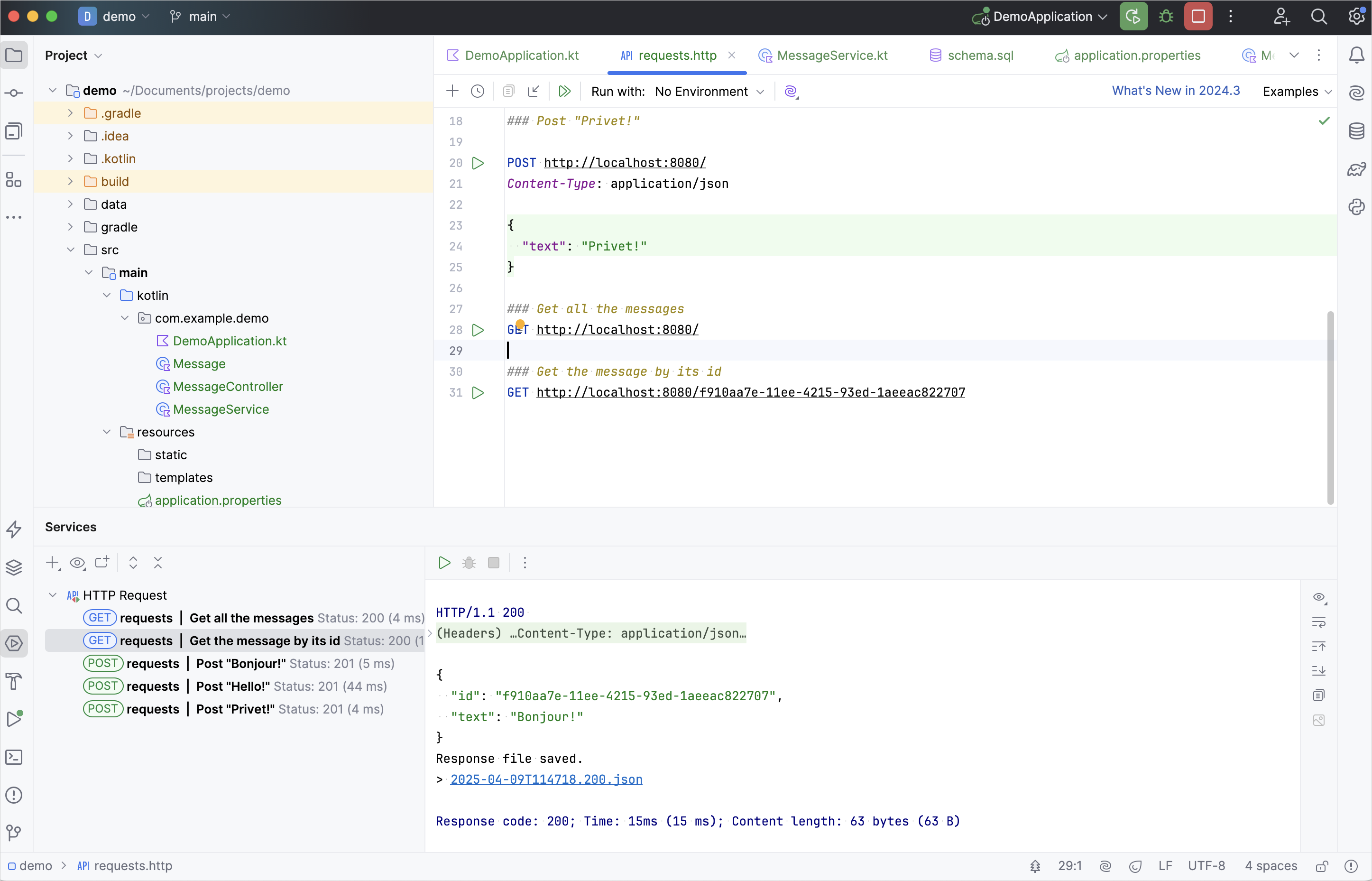
在 运行 工具窗口中,复制其中一个 id 并将其添加到请求中,如下所示:
http### Get the message by its id GET http://localhost:8080/f910aa7e-11ee-4215-93ed-1aeeac822707请使用您自己的消息 id 替换上面提到的 id。
执行 GET 请求并在 运行 工具窗口中查看结果:
下一步
最后一步将向您展示如何使用 Spring Data 以更流行的方式连接到数据库。